
In the previous notebook, we built a working generative model using a CNN (U-Net). It successfully learned to transform noise into digits. But that architecture has fundamental limitations that become apparent at scale.
In this notebook, we replace the CNN with a Diffusion Transformer (DiT) - the same architecture that powers Stable Diffusion 3, Sora, and other state-of-the-art image and video generators.
Why Move Beyond CNNs?
CNNs process images through local convolution kernels:
Layer 1: Each pixel sees 3×3 = 9 neighbors
Layer 2: Each pixel sees 5×5 = 25 pixels
Layer 3: Each pixel sees 7×7 = 49 pixels
  ...
Layer N: Receptive field grows linearly
To “see” the entire 28×28 image, you need many layers. Information must propagate step-by-step through the network, like a game of telephone.
Transformers take a different approach: every position can attend to every other position in a single layer.
| Aspect | CNN (U-Net) | Transformer (DiT) |
|---|---|---|
| Receptive field | Local, grows with depth | Global from layer 1 |
| Long-range dependencies | Requires many layers | Direct attention |
| Scaling behavior | Diminishing returns | Predictable improvement |
| Conditioning | Add/concatenate features | Modulate every operation |
The key finding from the DiT paper: transformers follow scaling laws. Double the compute, get predictably better results. This is why modern image generators have switched to transformers.
What We’ll Build
By the end of this notebook, you’ll understand:
Patchification - Converting images to token sequences
Positional embeddings - Encoding 2D spatial structure
Self-attention - The mathematical heart of transformers
Adaptive Layer Norm (adaLN) - Superior timestep conditioning
import torch
import torch.nn as nn
import torchvision
import torchvision.transforms as transforms
from torch.utils.data import DataLoader
import matplotlib.pyplot as plt
import numpy as np

%load_ext autoreload
%autoreload 2

# Set up device
from from_noise_to_images import get_device
device = get_device()
print(f"Using device: {device}")
Using device: cuda
Step 1: Patchification - Images as Token Sequences
Transformers were designed for sequences - words in a sentence, tokens in code. To apply them to images, we need to convert the 2D pixel grid into a 1D sequence.
The Patchification Process
For an image with patch size :
Divide into patches: Split into non-overlapping patches
Flatten each patch: Each patch becomes a vector of dimension
Project to embedding space: Linear projection
Concrete Example: Our MNIST Setup
For MNIST (28×28×1) with patch size 4:
| Step | Calculation | Result |
|---|---|---|
| Number of patches | patches | |
| Pixels per patch | 16 values | |
| Embedding dimension | (hyperparameter) | |
| Projection matrix | 4,096 parameters |
The Computational Win
Self-attention has complexity where is sequence length. Patches dramatically reduce this:
| Approach | Sequence Length | Attention Cost |
|---|---|---|
| Pixel-level | ||
| Patch-level (P=4) | ||
| Speedup | 256× |
The tradeoff: larger patches = fewer tokens = faster, but lose fine detail within each patch. For small images like MNIST, strikes a good balance.
# Load MNIST
transform = transforms.Compose([
    transforms.ToTensor(),
    transforms.Normalize((0.5,), (0.5,))
])

train_dataset = torchvision.datasets.MNIST(
    root="./data",
    train=True,
    download=True,
    transform=transform
)

sample_img, label = train_dataset[0]
print(f"Image shape: {sample_img.shape}")
print(f"Label: {label}")
Image shape: torch.Size([1, 28, 28])
Label: 5
def visualize_patchification(img, patch_size=4):
    """
    Visualize the patchification process step by step.
    """
    img_display = (img[0] + 1) / 2  # Denormalize
    H, W = img_display.shape
    num_patches_h = H // patch_size
    num_patches_w = W // patch_size
    N = num_patches_h * num_patches_w

    fig, axes = plt.subplots(1, 4, figsize=(16, 4))

    # Original image
    axes[0].imshow(img_display.numpy(), cmap='gray')
    axes[0].set_title(f'Original: $x \\in \\mathbb{{R}}^{{{H}\\times{W}\\times1}}$', fontsize=11)
    axes[0].axis('off')

    # Image with patch grid
    axes[1].imshow(img_display.numpy(), cmap='gray')
    for i in range(1, num_patches_h):
        axes[1].axhline(y=i * patch_size - 0.5, color='red', linewidth=1)
    for j in range(1, num_patches_w):
        axes[1].axvline(x=j * patch_size - 0.5, color='red', linewidth=1)
    axes[1].set_title(f'Divide: $N = {num_patches_h}\\times{num_patches_w} = {N}$ patches', fontsize=11)
    axes[1].axis('off')

    # Extract and show patches as sequence
    patches = img_display.unfold(0, patch_size, patch_size).unfold(1, patch_size, patch_size)
    patches = patches.reshape(-1, patch_size, patch_size)

    patch_grid = torchvision.utils.make_grid(
        patches[:14].unsqueeze(1), nrow=7, padding=1, pad_value=0.5
    )
    axes[2].imshow(patch_grid[0].numpy(), cmap='gray')
    axes[2].set_title(f'Flatten: each patch $\\in \\mathbb{{R}}^{{{patch_size**2}}}$', fontsize=11)
    axes[2].axis('off')

    # Show embedding projection conceptually
    embed_dim = 256
    projection = np.random.randn(patch_size**2, embed_dim) * 0.1
    axes[3].imshow(projection, aspect='auto', cmap='RdBu', vmin=-0.3, vmax=0.3)
    axes[3].set_xlabel(f'Embedding dim ({embed_dim})')
    axes[3].set_ylabel(f'Patch pixels ({patch_size**2})')
    axes[3].set_title(f'Project: $E \\in \\mathbb{{R}}^{{{patch_size**2}\\times{embed_dim}}}$', fontsize=11)

    plt.suptitle('Patchification: Image to Sequence of Embeddings', fontsize=14)
    plt.tight_layout()
    plt.show()

    print(f"\nPatchification Summary:")
    print(f"  Input:  {H}×{W}×1 = {H*W} pixel values")
    print(f"  Patches: {N} patches, each {patch_size}×{patch_size} = {patch_size**2} pixels")
    print(f"  Output: {N} tokens, each {embed_dim}-dimensional")
    print(f"  Attention cost: {H*W}² = {(H*W)**2:,} → {N}² = {N**2:,} ({(H*W)**2 // N**2}× reduction)")

visualize_patchification(sample_img, patch_size=4)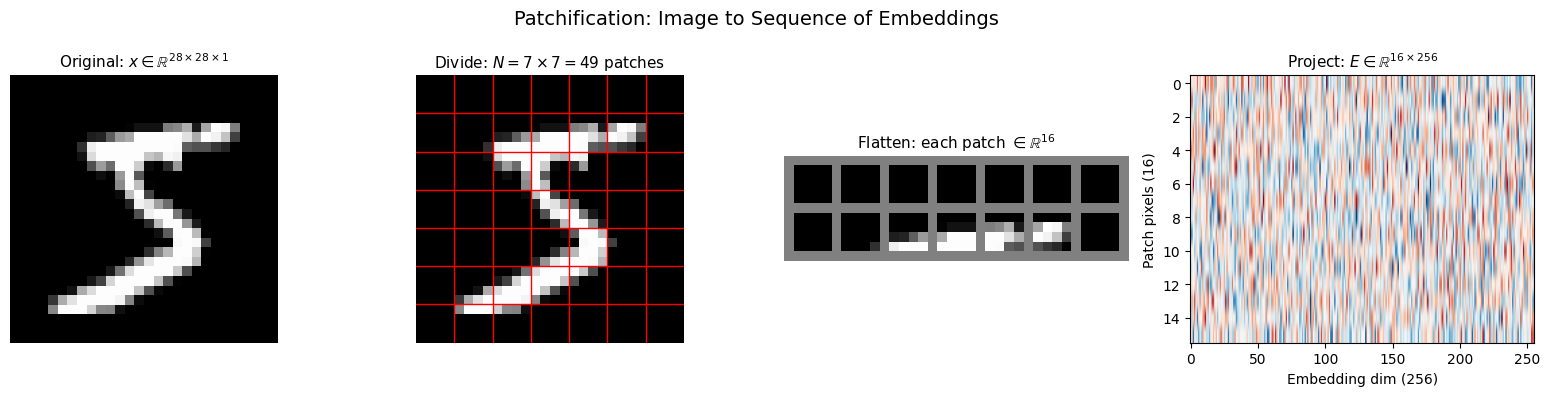
Patchification Summary:
  Input:  28×28×1 = 784 pixel values
  Patches: 49 patches, each 4×4 = 16 pixels
  Output: 49 tokens, each 256-dimensional
  Attention cost: 784² = 614,656 → 49² = 2,401 (256× reduction)
Step 2: Positional Embeddings - Encoding Spatial Structure
When we flatten patches into a sequence, we lose spatial information. The transformer sees:
But it doesn’t know that is in the top-left corner and is in the bottom-right!
The Solution: Add Position Information
We add a positional embedding to each patch embedding:
Sinusoidal Positional Encoding
We use the sinusoidal encoding from “Attention Is All You Need”:
where is the dimension index and is the total embedding dimension.
Why Sinusoids Work
| Property | Explanation |
|---|---|
| Unique encoding | Each position gets a distinct pattern |
| Relative positions | is a linear function of |
| Bounded values | All outputs in |
| No learned parameters | Works for any sequence length |
The key insight: different dimensions oscillate at different frequencies. Low dimensions change slowly (capture long-range position), high dimensions change quickly (capture fine position).
2D Extension for Images
For images, we encode both row and column:
Each position gets a -dimensional vector: half for row, half for column.
def visualize_positional_embeddings(grid_size=7, embed_dim=256):
    """
    Visualize 2D sinusoidal positional embeddings.
    """
    import math

    # Create 1D sinusoidal embeddings
    half_dim = embed_dim // 4  # sin_row, cos_row, sin_col, cos_col

    # Frequency bands: 10000^(-2i/d)
    freq = math.log(10000) / (half_dim - 1)
    freq = torch.exp(torch.arange(half_dim) * -freq)

    # Position indices
    pos = torch.arange(grid_size).float()

    # Compute PE: pos × freq gives the angle
    angles = pos[:, None] * freq[None, :]  # (grid_size, half_dim)
    sin_emb = torch.sin(angles)
    cos_emb = torch.cos(angles)
    pos_1d = torch.cat([sin_emb, cos_emb], dim=-1)  # (grid_size, embed_dim/2)

    # Create 2D embeddings
    row_emb = pos_1d.unsqueeze(1).expand(-1, grid_size, -1)
    col_emb = pos_1d.unsqueeze(0).expand(grid_size, -1, -1)
    pos_2d = torch.cat([row_emb, col_emb], dim=-1)  # (7, 7, 256)
    pos_flat = pos_2d.view(-1, embed_dim)  # (49, 256)

    fig, axes = plt.subplots(2, 2, figsize=(14, 12))

    # 1D embeddings
    im = axes[0, 0].imshow(pos_1d.numpy(), aspect='auto', cmap='RdBu')
    axes[0, 0].set_xlabel('Dimension')
    axes[0, 0].set_ylabel('Position (0-6)')
    axes[0, 0].set_title('1D Sinusoidal Encoding\n$PE(pos) = [\\sin(pos/\\omega_i), \\cos(pos/\\omega_i)]$')
    plt.colorbar(im, ax=axes[0, 0])

    # Full 2D embedding matrix
    im = axes[0, 1].imshow(pos_flat.numpy(), aspect='auto', cmap='RdBu')
    axes[0, 1].set_xlabel('Embedding dimension')
    axes[0, 1].set_ylabel('Patch index (0-48)')
    axes[0, 1].set_title(f'2D Positional Embeddings\n$PE_{{2D}}(r,c) \\in \\mathbb{{R}}^{{{embed_dim}}}$')
    plt.colorbar(im, ax=axes[0, 1])

    # Dot-product similarity
    similarity = torch.mm(pos_flat, pos_flat.T)
    similarity = similarity / similarity.max()
    im = axes[1, 0].imshow(similarity.numpy(), cmap='viridis')
    axes[1, 0].set_xlabel('Patch index')
    axes[1, 0].set_ylabel('Patch index')
    axes[1, 0].set_title('Position Similarity: $PE_i \\cdot PE_j$\n(brighter = more similar)')
    plt.colorbar(im, ax=axes[1, 0])

    # Spatial similarity from center
    center = 24  # Center of 7×7 grid
    center_sim = similarity[center].view(grid_size, grid_size)
    im = axes[1, 1].imshow(center_sim.numpy(), cmap='viridis')
    axes[1, 1].plot(3, 3, 'r*', markersize=20, label='Query patch')
    axes[1, 1].set_title(f'Similarity to center patch\n(nearby patches more similar)')
    axes[1, 1].legend()
    plt.colorbar(im, ax=axes[1, 1])

    plt.tight_layout()
    plt.show()

    print("\nPositional Embedding Properties:")
    print(f"  • Each position gets a unique {embed_dim}D vector")
    print(f"  • Nearby patches have similar embeddings (high dot product)")
    print(f"  • Distant patches have dissimilar embeddings (low dot product)")
    print(f"  • The model learns to interpret these patterns")

visualize_positional_embeddings()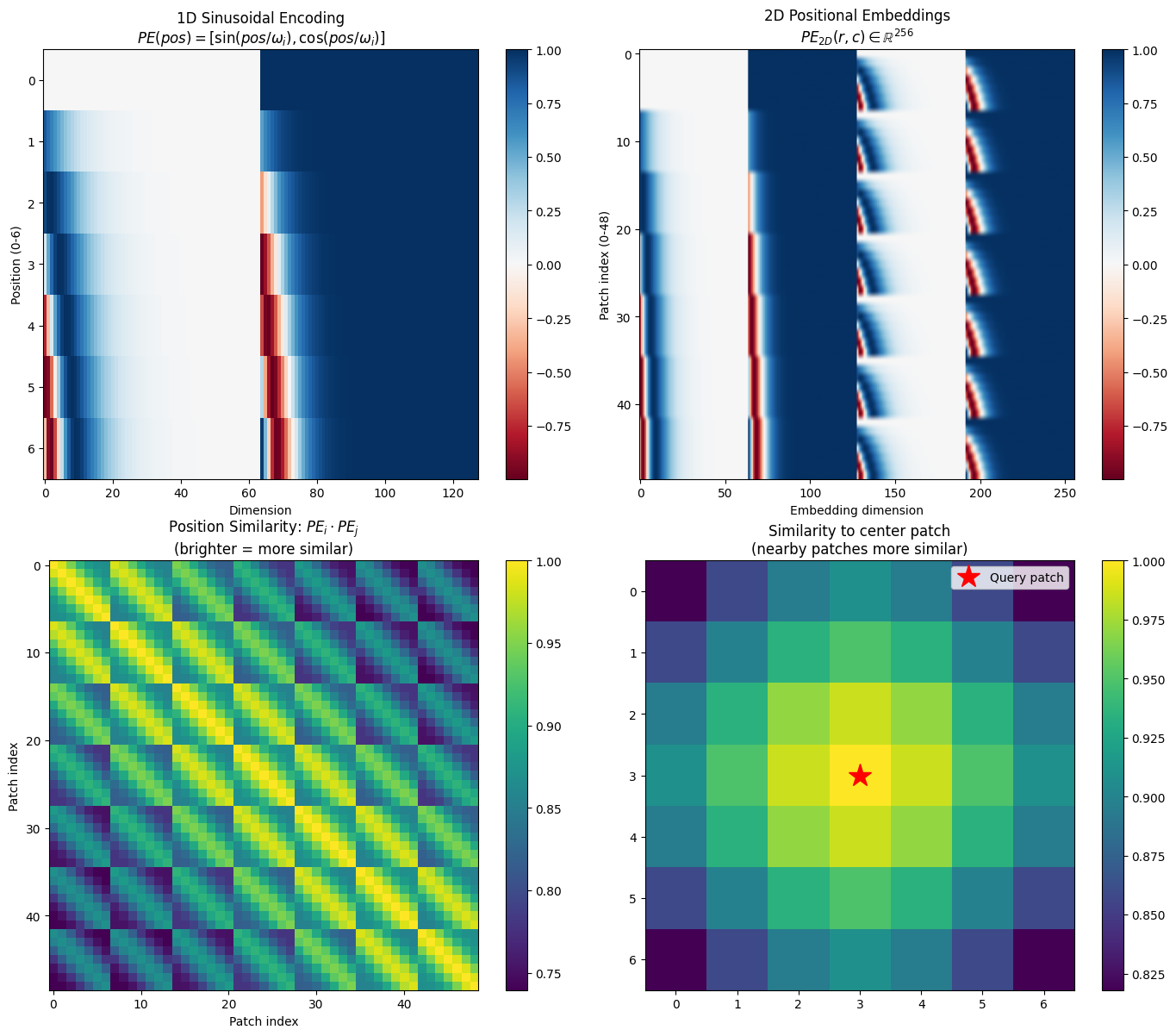
Positional Embedding Properties:
  • Each position gets a unique 256D vector
  • Nearby patches have similar embeddings (high dot product)
  • Distant patches have dissimilar embeddings (low dot product)
  • The model learns to interpret these patterns
Step 3: Self-Attention - The Heart of Transformers
Self-attention is what gives transformers their power. Unlike CNNs where each location only sees its local neighborhood, attention lets every token interact with every other token in a single operation.
The Attention Mechanism
Given input tokens (N tokens, D dimensions each):
Step 1: Project to Query, Key, Value
where are learned projection matrices.
Step 2: Compute attention scores
Entry tells us: “How much should token attend to token ?”
Step 3: Aggregate values
Each output token is a weighted combination of all value vectors, with weights from the attention matrix.
Understanding Q, K, V
| Component | Intuition | Question It Answers |
|---|---|---|
| Query (Q) | “What am I looking for?” | What information does this token need? |
| Key (K) | “What do I contain?” | What information does this token have? |
| Value (V) | “What do I provide?” | What content should be passed along? |
When is large, token strongly attends to token .
The Scaling Factor 
Why divide by ? Without it:
Dot products have variance proportional to
Large values make softmax nearly one-hot
Gradients vanish, training fails
Dividing by normalizes the variance to ~1, keeping gradients healthy.
Multi-Head Attention
Instead of one attention operation, we run parallel “heads”:
where each head uses dimension . This lets the model attend to different aspects simultaneously - one head might focus on local structure, another on global patterns.
def visualize_attention_mechanism():
    """
    Visualize the self-attention computation step by step.
    """
    N = 7  # 7 tokens (simplified for visualization)
    D = 4  # 4 dimensions

    # Create sample input
    np.random.seed(42)
    X = torch.randn(N, D)

    # Learned projections (random for illustration)
    W_Q = torch.randn(D, D) * 0.5
    W_K = torch.randn(D, D) * 0.5
    W_V = torch.randn(D, D) * 0.5

    # Compute Q, K, V
    Q = X @ W_Q
    K = X @ W_K
    V = X @ W_V

    # Compute attention scores
    scores = Q @ K.T / np.sqrt(D)
    attention = torch.softmax(scores, dim=-1)

    # Compute output
    output = attention @ V

    fig, axes = plt.subplots(2, 4, figsize=(16, 8))

    # Row 1: The computation
    vmin, vmax = -2, 2

    axes[0, 0].imshow(X.numpy(), cmap='RdBu', vmin=vmin, vmax=vmax)
    axes[0, 0].set_title('Input $X$\n$(N \\times D)$', fontsize=11)
    axes[0, 0].set_xlabel('Dimensions')
    axes[0, 0].set_ylabel('Tokens')

    axes[0, 1].imshow(Q.numpy(), cmap='RdBu', vmin=vmin, vmax=vmax)
    axes[0, 1].set_title('Query $Q = XW_Q$\n"What am I looking for?"', fontsize=11)
    axes[0, 1].set_xlabel('Dimensions')

    axes[0, 2].imshow(K.numpy(), cmap='RdBu', vmin=vmin, vmax=vmax)
    axes[0, 2].set_title('Key $K = XW_K$\n"What do I contain?"', fontsize=11)
    axes[0, 2].set_xlabel('Dimensions')

    axes[0, 3].imshow(V.numpy(), cmap='RdBu', vmin=vmin, vmax=vmax)
    axes[0, 3].set_title('Value $V = XW_V$\n"What do I provide?"', fontsize=11)
    axes[0, 3].set_xlabel('Dimensions')

    # Row 2: Attention computation
    axes[1, 0].imshow(scores.numpy(), cmap='RdBu')
    axes[1, 0].set_title('Scores: $QK^T / \\sqrt{D}$', fontsize=11)
    axes[1, 0].set_xlabel('Key token')
    axes[1, 0].set_ylabel('Query token')

    im = axes[1, 1].imshow(attention.numpy(), cmap='Reds')
    axes[1, 1].set_title('Attention: $\\text{softmax}(\\cdot)$\n(rows sum to 1)', fontsize=11)
    axes[1, 1].set_xlabel('Key token')
    axes[1, 1].set_ylabel('Query token')
    plt.colorbar(im, ax=axes[1, 1])

    axes[1, 2].imshow(output.numpy(), cmap='RdBu', vmin=vmin, vmax=vmax)
    axes[1, 2].set_title('Output: $\\text{Attention} \\times V$', fontsize=11)
    axes[1, 2].set_xlabel('Dimensions')
    axes[1, 2].set_ylabel('Tokens')

    # Show attention pattern for one query
    query_idx = 3
    axes[1, 3].bar(range(N), attention[query_idx].numpy())
    axes[1, 3].set_title(f'Token {query_idx} attends to:', fontsize=11)
    axes[1, 3].set_xlabel('Token index')
    axes[1, 3].set_ylabel('Attention weight')
    axes[1, 3].set_ylim(0, 1)

    plt.suptitle('Self-Attention: $\\text{Attention}(Q,K,V) = \\text{softmax}(QK^T/\\sqrt{D}) \\cdot V$', fontsize=14)
    plt.tight_layout()
    plt.show()

    print(f"\nAttention Properties:")
    print(f"  • Input: {N} tokens × {D} dimensions")
    print(f"  • Attention matrix: {N}×{N} = {N**2} pairwise interactions")
    print(f"  • Each row sums to 1 (probability distribution over keys)")
    print(f"  • Complexity: O(N²D) - quadratic in sequence length")

visualize_attention_mechanism()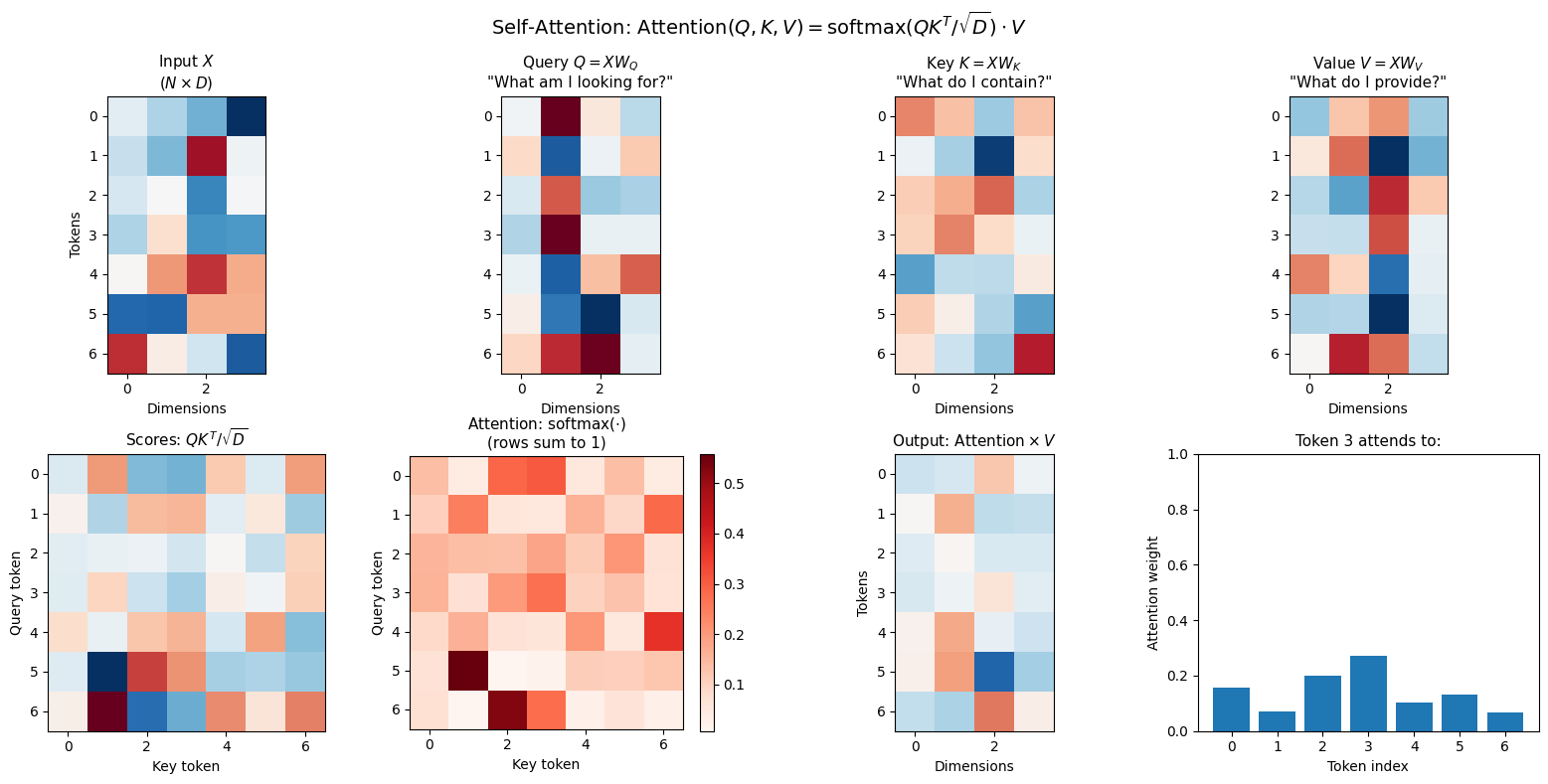
Attention Properties:
  • Input: 7 tokens × 4 dimensions
  • Attention matrix: 7×7 = 49 pairwise interactions
  • Each row sums to 1 (probability distribution over keys)
  • Complexity: O(N²D) - quadratic in sequence length
def visualize_image_attention_patterns():
    """
    Show what attention patterns might look like for image patches.
    """
    grid_size = 7
    N = grid_size ** 2  # 49 patches

    fig, axes = plt.subplots(2, 4, figsize=(16, 8))

    query_pos = (3, 3)  # Center patch
    query_idx = query_pos[0] * grid_size + query_pos[1]

    patterns = [
        ('Uniform', np.ones((grid_size, grid_size)) / N),
        ('Local (Gaussian)', None),
        ('Horizontal', None),
        ('Vertical', None),
        ('Diagonal', None),
        ('Sparse', None),
        ('Learned (example)', None),
        ('Cross', None),
    ]

    # Compute patterns
    # Local Gaussian
    local = np.zeros((grid_size, grid_size))
    for i in range(grid_size):
        for j in range(grid_size):
            dist = np.sqrt((i - query_pos[0])**2 + (j - query_pos[1])**2)
            local[i, j] = np.exp(-dist**2 / 2)
    patterns[1] = ('Local (Gaussian)', local / local.sum())

    # Horizontal
    horiz = np.zeros((grid_size, grid_size))
    horiz[query_pos[0], :] = 1
    patterns[2] = ('Horizontal', horiz / horiz.sum())

    # Vertical
    vert = np.zeros((grid_size, grid_size))
    vert[:, query_pos[1]] = 1
    patterns[3] = ('Vertical', vert / vert.sum())

    # Diagonal
    diag = np.zeros((grid_size, grid_size))
    for i in range(grid_size):
        diag[i, i] = 1
        if grid_size - 1 - i >= 0:
            diag[i, grid_size - 1 - i] = 0.5
    patterns[4] = ('Diagonal', diag / diag.sum())

    # Sparse (corners + center)
    sparse = np.zeros((grid_size, grid_size))
    sparse[0, 0] = sparse[0, -1] = sparse[-1, 0] = sparse[-1, -1] = 1
    sparse[3, 3] = 2
    patterns[5] = ('Corners + Center', sparse / sparse.sum())

    # Learned-like (mixture)
    learned = local + 0.5 * horiz + 0.3 * np.random.rand(grid_size, grid_size)
    patterns[6] = ('Learned (mixed)', learned / learned.sum())

    # Cross
    cross = horiz + vert
    patterns[7] = ('Cross', cross / cross.sum())

    for idx, (name, pattern) in enumerate(patterns):
        ax = axes[idx // 4, idx % 4]
        im = ax.imshow(pattern, cmap='Reds', vmin=0)
        ax.plot(query_pos[1], query_pos[0], 'b*', markersize=15)
        ax.set_title(name, fontsize=11)
        ax.axis('off')

    plt.suptitle('Possible Attention Patterns (star = query patch, red = attention weights)', fontsize=14)
    plt.tight_layout()
    plt.show()

    print("\nPatterns the model might learn:")
    print("  • Early layers: Local patterns (like CNN kernels)")
    print("  • Middle layers: Structural patterns (horizontal, vertical strokes)")
    print("  • Late layers: Semantic patterns (attend to digit-specific regions)")
    print("  • The model learns which patterns are useful!")

visualize_image_attention_patterns()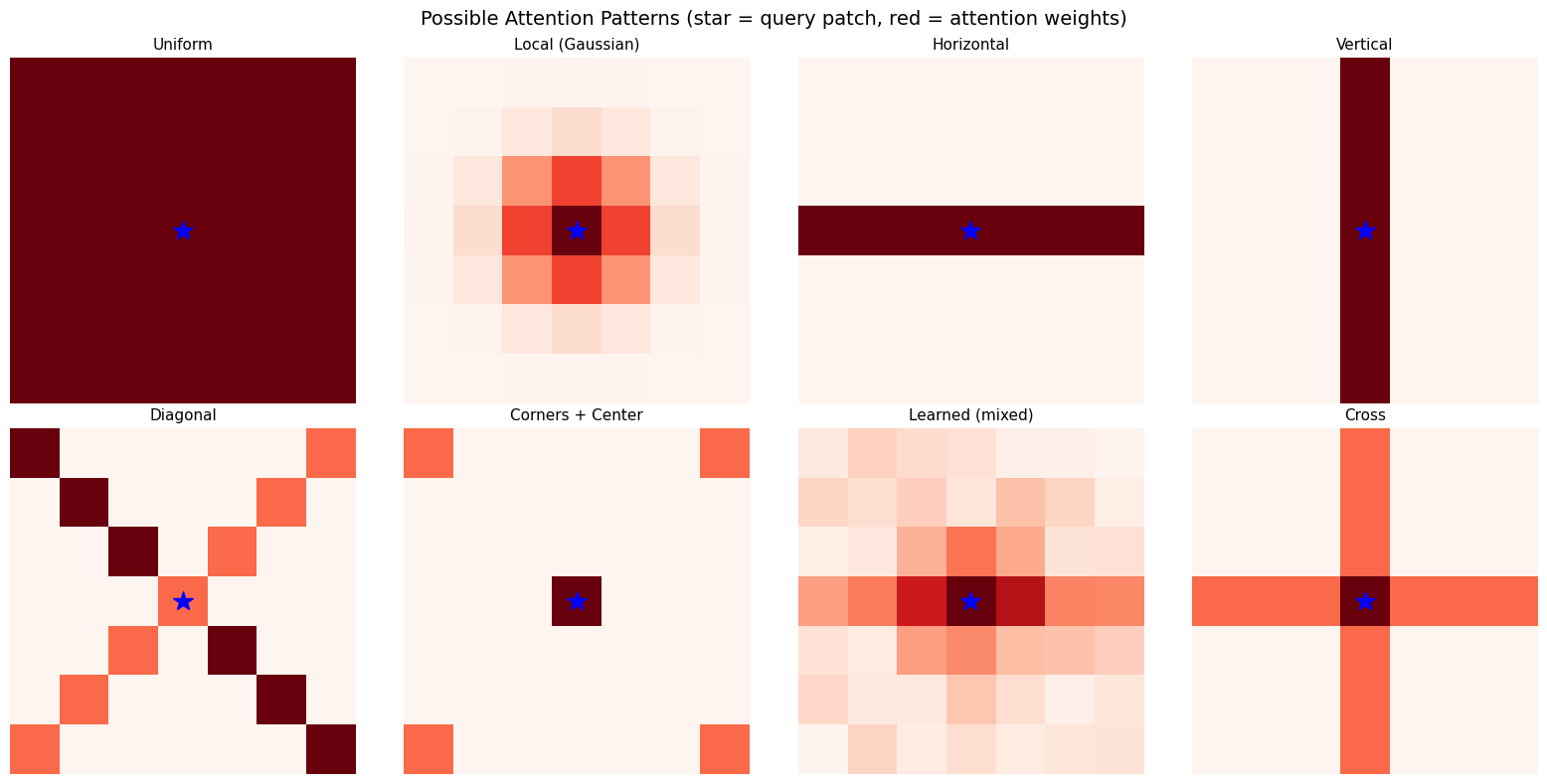
Patterns the model might learn:
  • Early layers: Local patterns (like CNN kernels)
  • Middle layers: Structural patterns (horizontal, vertical strokes)
  • Late layers: Semantic patterns (attend to digit-specific regions)
  • The model learns which patterns are useful!
Step 4: Adaptive Layer Normalization (adaLN)
How do we tell the model what timestep we’re at? In the previous notebook, we simply added the timestep embedding to feature maps. DiT uses a more powerful approach: Adaptive Layer Normalization.
Standard Layer Normalization
Layer norm normalizes activations and applies a learned affine transform:
where:
= mean and std of (computed per-sample)
= learned scale and shift parameters (same for all inputs)
Adaptive Layer Norm (adaLN)
Instead of learned , we predict them from the timestep:
Why adaLN Is Powerful
| Approach | What It Does | Conditioning Strength |
|---|---|---|
| Additive | Shifts activations | Weak |
| Concatenation | Separate channels | Medium |
| adaLN | Scales AND shifts every activation | Strong |
adaLN modulates the entire distribution of activations. At each timestep, the model can:
Amplify certain features ()
Suppress others ()
Shift the operating point ()
Timestep-Dependent Behavior
Consider how the task changes with timestep:
(mostly noise): Find large-scale structure, ignore high-frequency details
(mostly data): Refine fine details, preserve structure
adaLN lets the model behave completely differently at different timesteps by controlling which features are active.
from from_noise_to_images.dit import TimestepEmbedding, AdaLN

def visualize_adaln_modulation():
    """
    Show how adaLN parameters vary with timestep.
    """
    embed_dim = 256
    cond_dim = embed_dim * 4

    time_embed = TimestepEmbedding(embed_dim, cond_dim)
    adaln = AdaLN(embed_dim, cond_dim)

    timesteps = torch.linspace(0, 1, 100)

    scales = []
    shifts = []

    with torch.no_grad():
        for t in timesteps:
            cond = time_embed(t.unsqueeze(0))
            params = adaln.proj(cond)
            scale, shift = params.chunk(2, dim=-1)
            scales.append(scale.squeeze().numpy())
            shifts.append(shift.squeeze().numpy())

    scales = np.array(scales)  # (100, 256)
    shifts = np.array(shifts)

    fig, axes = plt.subplots(2, 2, figsize=(14, 10))

    # Scale heatmap
    im = axes[0, 0].imshow(scales.T, aspect='auto', cmap='RdBu',
                           extent=[0, 1, embed_dim, 0], vmin=-1, vmax=1)
    axes[0, 0].set_xlabel('Timestep $t$')
    axes[0, 0].set_ylabel('Dimension')
    axes[0, 0].set_title('Scale $\\gamma(t)$: How much to amplify each dimension')
    plt.colorbar(im, ax=axes[0, 0])

    # Shift heatmap
    im = axes[0, 1].imshow(shifts.T, aspect='auto', cmap='RdBu',
                           extent=[0, 1, embed_dim, 0], vmin=-1, vmax=1)
    axes[0, 1].set_xlabel('Timestep $t$')
    axes[0, 1].set_ylabel('Dimension')
    axes[0, 1].set_title('Shift $\\beta(t)$: How much to shift each dimension')
    plt.colorbar(im, ax=axes[0, 1])

    # Selected dimensions
    for d in [0, 64, 128, 192]:
        axes[1, 0].plot(timesteps.numpy(), scales[:, d], label=f'dim {d}')
    axes[1, 0].set_xlabel('Timestep $t$')
    axes[1, 0].set_ylabel('Scale $\\gamma$')
    axes[1, 0].set_title('Scale values for selected dimensions')
    axes[1, 0].legend()
    axes[1, 0].grid(True, alpha=0.3)

    # Mean ± std
    mean_scale = scales.mean(axis=1)
    std_scale = scales.std(axis=1)
    mean_shift = shifts.mean(axis=1)
    std_shift = shifts.std(axis=1)

    axes[1, 1].plot(timesteps.numpy(), mean_scale, 'b-', label='Mean scale', linewidth=2)
    axes[1, 1].fill_between(timesteps.numpy(), mean_scale - std_scale, mean_scale + std_scale, alpha=0.3)
    axes[1, 1].plot(timesteps.numpy(), mean_shift, 'r-', label='Mean shift', linewidth=2)
    axes[1, 1].fill_between(timesteps.numpy(), mean_shift - std_shift, mean_shift + std_shift, alpha=0.3, color='red')
    axes[1, 1].set_xlabel('Timestep $t$')
    axes[1, 1].set_ylabel('Parameter value')
    axes[1, 1].set_title('Mean adaLN parameters (±1 std)')
    axes[1, 1].legend()
    axes[1, 1].grid(True, alpha=0.3)

    plt.suptitle('Adaptive Layer Norm: $\\text{adaLN}(x, t) = \\gamma(t) \\odot \\text{Norm}(x) + \\beta(t)$', fontsize=14)
    plt.tight_layout()
    plt.show()

    print("\nadaLN Insights:")
    print("  • Each timestep produces different γ and β values")
    print("  • The model can amplify/suppress different features at different t")
    print("  • This is much more expressive than just adding timestep embeddings")
    print(f"  • Formula: output = γ(t) × LayerNorm(x) + β(t)")

visualize_adaln_modulation()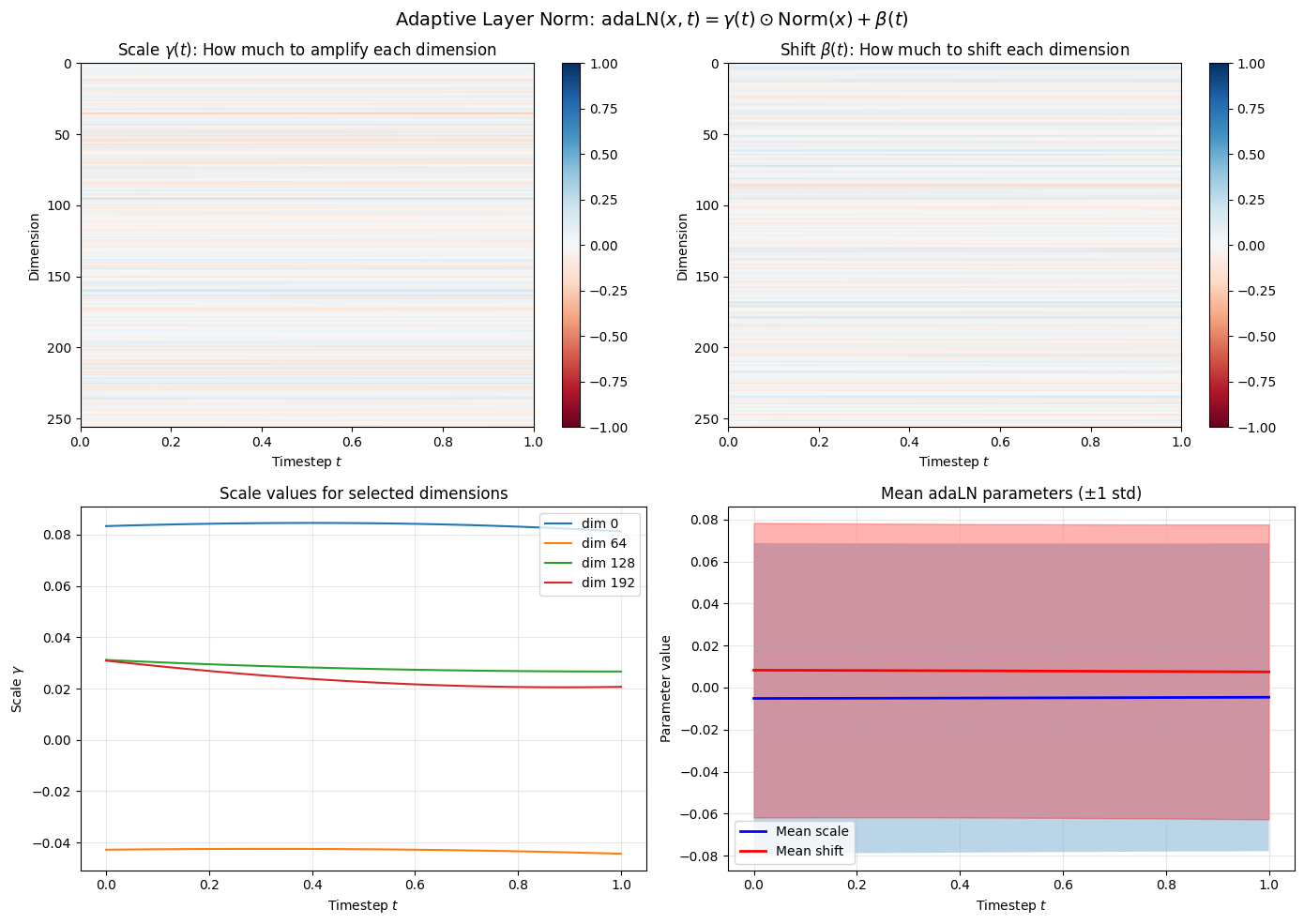
adaLN Insights:
  • Each timestep produces different γ and β values
  • The model can amplify/suppress different features at different t
  • This is much more expressive than just adding timestep embeddings
  • Formula: output = γ(t) × LayerNorm(x) + β(t)
Step 5: The Complete DiT Architecture
Now we put all the pieces together. The DiT processes images through:
Forward Pass
Patchify:
Embed + Position:
Timestep Conditioning:
Transformer Blocks (repeat times):
Unpatchify:
DiT Block Structure
Input z
   │
   ├───────────────────────────────────┐
   │                                   │ (residual)
   ▼                                   │
adaLN(z, c) ──► Self-Attention ──► + ──┤
                                       │
   ├───────────────────────────────────┘
   │                                   │ (residual)
   ▼                                   │
adaLN(z, c) ──► MLP ──────────────► + ──┘
   │
   ▼
Output z
Computational Complexity
| Component | Complexity | For MNIST (N=49, D=256) |
|---|---|---|
| Self-Attention | 49² × 256 ≈ 600K ops | |
| MLP | 49 × 256² ≈ 3.2M ops | |
| Per Block | ≈ 3.8M ops | |
| Full Model (6 blocks) | ≈ 23M ops |
from from_noise_to_images.dit import DiT

# Create DiT model
model = DiT(
    img_size=28,       # MNIST
    patch_size=4,      # 7×7 = 49 patches
    in_channels=1,     # Grayscale
    embed_dim=256,     # Embedding dimension D
    depth=6,           # Number of transformer blocks L
    num_heads=8,       # Attention heads H (256/8 = 32 dim per head)
    mlp_ratio=4.0,     # MLP hidden = 256 × 4 = 1024
).to(device)

num_params = sum(p.numel() for p in model.parameters() if p.requires_grad)
print(f"DiT Parameters: {num_params:,}")
print(f"\nArchitecture:")
print(f"  Patches: 7×7 = 49 (sequence length N)")
print(f"  Embedding: D = 256")
print(f"  Heads: H = 8 (head dim = 256/8 = 32)")
print(f"  MLP hidden: 256 × 4 = 1024")
print(f"  Blocks: L = 6")

# Test forward pass
test_x = torch.randn(4, 1, 28, 28, device=device)
test_t = torch.rand(4, device=device)

with torch.no_grad():
    test_out = model(test_x, test_t)

print(f"\nForward pass:")
print(f"  Input:  {test_x.shape}")
print(f"  Output: {test_out.shape}")
print(f"  Output matches input shape (predicts velocity field)")
DiT Parameters: 12,351,760
Architecture:
Patches: 7×7 = 49 (sequence length N)
Embedding: D = 256
Heads: H = 8 (head dim = 256/8 = 32)
MLP hidden: 256 × 4 = 1024
Blocks: L = 6
Forward pass:
Input: torch.Size([4, 1, 28, 28])
Output: torch.Size([4, 1, 28, 28])
Output matches input shape (predicts velocity field)
# Trace through the model step by step
print("=" * 65)
print("TRACING DiT FORWARD PASS")
print("=" * 65)

x = torch.randn(1, 1, 28, 28, device=device)
t = torch.tensor([0.5], device=device)

print(f"\n1. INPUT")
print(f"   x: {tuple(x.shape)} (image)")
print(f"   t = {t.item():.1f} (timestep)")

with torch.no_grad():
    # Patchify
    patches = model.patch_embed(x)
    print(f"\n2. PATCHIFY")
    print(f"   {x.shape} → {patches.shape}")
    print(f"   (28×28 image → 49 patches × 256 dim)")

    # Position embed
    patches_pos = model.pos_embed(patches)
    print(f"\n3. POSITIONAL EMBEDDING")
    print(f"   Add PE: {patches_pos.shape}")
    print(f"   (Each patch now knows its 2D position)")

    # Time embed
    cond = model.time_embed(t)
    print(f"\n4. TIMESTEP CONDITIONING")
    print(f"   t={t.item():.1f} → cond: {tuple(cond.shape)}")
    print(f"   (Sinusoidal → MLP → conditioning vector)")

    # Transformer blocks
    print(f"\n5. TRANSFORMER BLOCKS (×{len(model.blocks)})")
    print(f"   Each block: adaLN → Attention → adaLN → MLP")
    print(f"   Residual connections preserve information")

    # Output
    output = model(x, t)
    print(f"\n6. OUTPUT")
    print(f"   Final norm → Linear → Unpatchify")
    print(f"   {patches.shape} → {output.shape}")
    print(f"   (Predicted velocity field)")
=================================================================
TRACING DiT FORWARD PASS
=================================================================
1. INPUT
x: (1, 1, 28, 28) (image)
t = 0.5 (timestep)
2. PATCHIFY
torch.Size([1, 1, 28, 28]) → torch.Size([1, 49, 256])
(28×28 image → 49 patches × 256 dim)
3. POSITIONAL EMBEDDING
Add PE: torch.Size([1, 49, 256])
(Each patch now knows its 2D position)
4. TIMESTEP CONDITIONING
t=0.5 → cond: (1, 1024)
(Sinusoidal → MLP → conditioning vector)
5. TRANSFORMER BLOCKS (×6)
Each block: adaLN → Attention → adaLN → MLP
Residual connections preserve information
6. OUTPUT
Final norm → Linear → Unpatchify
torch.Size([1, 49, 256]) → torch.Size([1, 1, 28, 28])
(Predicted velocity field)
Step 6: Training
The beauty of flow matching: the training objective is architecture-agnostic:
We can swap U-Net for DiT without changing anything else:
Same forward process:
Same velocity target:
Same loss: MSE between predicted and true velocity
Same sampling: Euler integration of the ODE
CNN vs DiT Training
| Aspect | U-Net (CNN) | DiT |
|---|---|---|
| Parameters | ~1.8M | ~12.4M |
| Memory | Lower | Higher (attention matrices) |
| Speed per step | Faster | Slower |
| Convergence | Quick | Needs more epochs |
| Scaling | Diminishing returns | Predictable improvement |
from from_noise_to_images.train import Trainer

train_loader = DataLoader(
    train_dataset,
    batch_size=128,
    shuffle=True,
    num_workers=0,
    drop_last=True
)

trainer = Trainer(
    model=model,
    dataloader=train_loader,
    lr=1e-4,
    weight_decay=0.01,
    device=device,
)

print("Training DiT with flow matching objective...")
print(f"Loss: L = ||v_theta(x_t, t) - (x_1 - x_0)||^2")
print()

NUM_EPOCHS = 30
losses = trainer.train(num_epochs=NUM_EPOCHS)
Training DiT with flow matching objective...
Loss: L = ||v_theta(x_t, t) - (x_1 - x_0)||^2
Training on cuda
Model parameters: 12,351,760
Epoch 1: avg_loss = 0.8359
Epoch 2: avg_loss = 0.3384
Epoch 3: avg_loss = 0.3044
Epoch 4: avg_loss = 0.2935
Epoch 5: avg_loss = 0.2856
Epoch 6: avg_loss = 0.2810
Epoch 7: avg_loss = 0.2761
Epoch 8: avg_loss = 0.2702
Epoch 9: avg_loss = 0.2588
Epoch 10: avg_loss = 0.2414
Epoch 11: avg_loss = 0.2320
Epoch 12: avg_loss = 0.2244
Epoch 13: avg_loss = 0.2206
Epoch 14: avg_loss = 0.2168
Epoch 15: avg_loss = 0.2146
Epoch 16: avg_loss = 0.2123
Epoch 17: avg_loss = 0.2106
Epoch 18: avg_loss = 0.2077
Epoch 19: avg_loss = 0.2060
Epoch 20: avg_loss = 0.2051
Epoch 21: avg_loss = 0.2028
Epoch 22: avg_loss = 0.2022
Epoch 23: avg_loss = 0.2014
Epoch 24: avg_loss = 0.1995
Epoch 25: avg_loss = 0.1992
Epoch 26: avg_loss = 0.1981
Epoch 27: avg_loss = 0.1970
Epoch 28: avg_loss = 0.1965
Epoch 29: avg_loss = 0.1957
Epoch 30: avg_loss = 0.1947
plt.figure(figsize=(10, 4))
plt.plot(losses, marker='o', markersize=4)
plt.xlabel('Epoch', fontsize=12)
plt.ylabel('MSE Loss', fontsize=12)
plt.title('DiT Training: $\\mathcal{L} = \\|v_\\theta(x_t, t) - v\\|^2$', fontsize=14)
plt.grid(True, alpha=0.3)
plt.show()

print(f"Final loss: {losses[-1]:.4f}")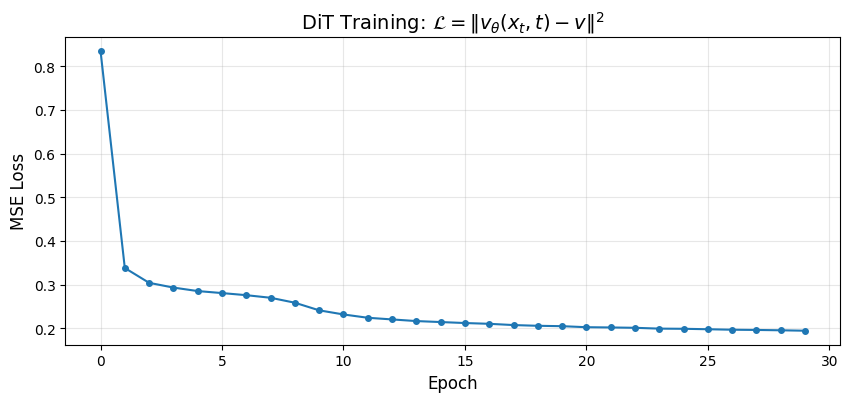
Final loss: 0.1947
Step 7: Generation
Generation uses the same ODE as before:
Starting from at , integrate backward to :
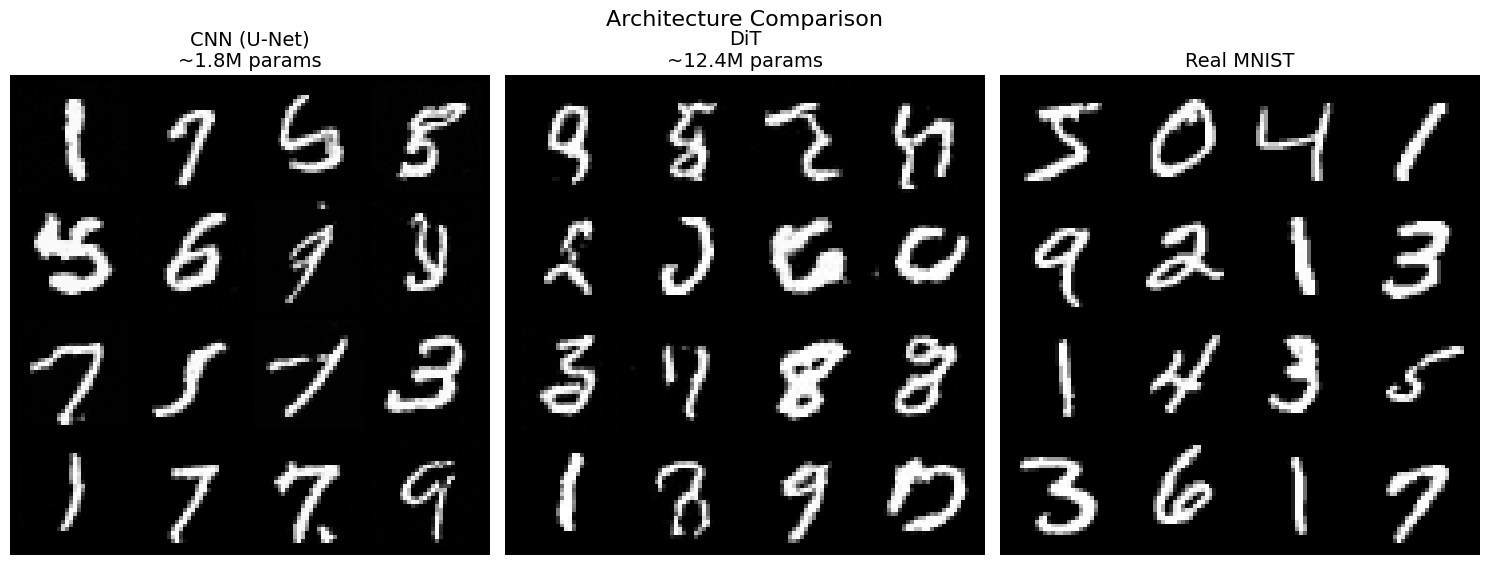
The DiT’s global attention should produce more coherent samples than the CNN’s local processing.
from from_noise_to_images.sampling import sample

def show_images(images, nrow=8, title=""):
    images = (images + 1) / 2
    images = images.clamp(0, 1)
    grid = torchvision.utils.make_grid(images, nrow=nrow, padding=2)
    plt.figure(figsize=(12, 12 * grid.shape[1] / grid.shape[2]))
    plt.imshow(grid.permute(1, 2, 0).cpu().numpy(), cmap='gray')
    plt.axis('off')
    if title:
        plt.title(title, fontsize=14)
    plt.show()

model.eval()
with torch.no_grad():
    generated, trajectory = sample(
        model=model,
        num_samples=64,
        image_shape=(1, 28, 28),
        num_steps=50,
        device=device,
        return_trajectory=True,
    )

show_images(generated, nrow=8, title="DiT Generated Samples")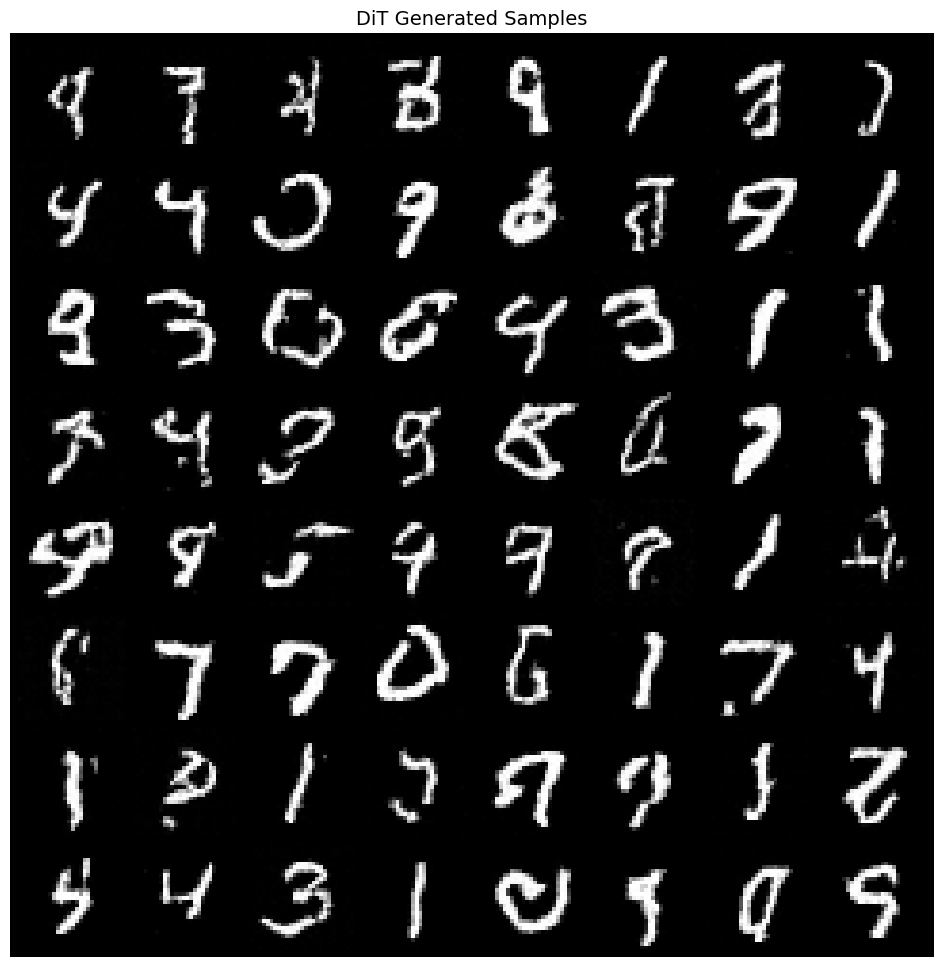
# Visualize generation process
num_to_show = 4
steps_to_show = [0, 5, 10, 20, 30, 40, 50]

fig, axes = plt.subplots(num_to_show, len(steps_to_show), figsize=(14, 8))

for row in range(num_to_show):
    for col, step_idx in enumerate(steps_to_show):
        img = (trajectory[step_idx][row, 0] + 1) / 2
        axes[row, col].imshow(img.cpu().numpy(), cmap='gray')
        axes[row, col].axis('off')
        if row == 0:
            t_val = 1.0 - step_idx / 50
            axes[row, col].set_title(f'$t={t_val:.2f}$')

plt.suptitle('DiT Generation: Solving $dx/dt = v_\\theta(x,t)$ from $t=1$ to $t=0$', fontsize=14)
plt.tight_layout()
plt.show()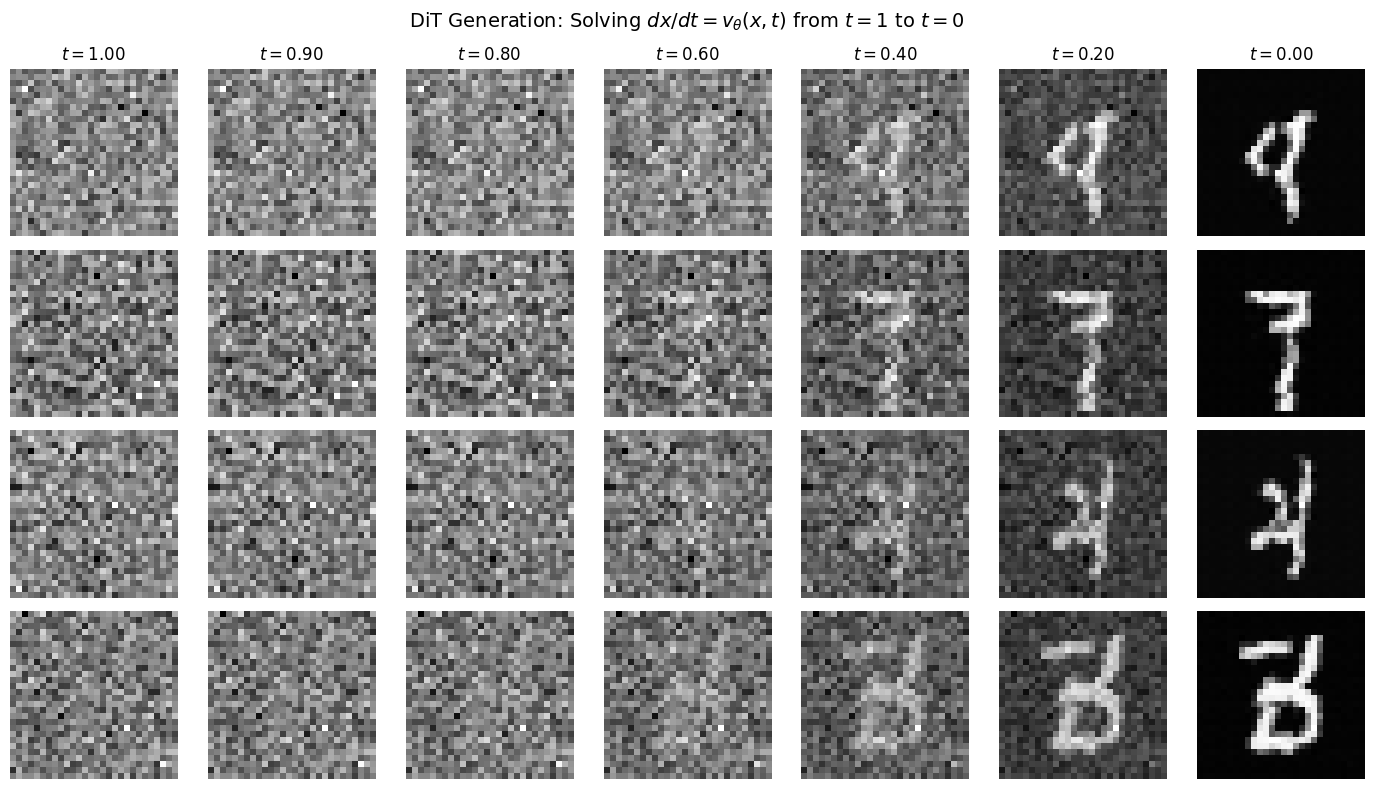
Step 8: CNN vs DiT Comparison
Let’s compare the two architectures side by side:
| Architecture | Parameters | Receptive Field | Conditioning |
|---|---|---|---|
| U-Net (CNN) | ~1.8M | Local → Global | Additive |
| DiT | ~12.4M | Global (layer 1) | adaLN (multiplicative) |
import os
from from_noise_to_images.models import SimpleUNet

# Load or train CNN
cnn_model = SimpleUNet(in_channels=1, model_channels=64, time_emb_dim=128).to(device)

if os.path.exists("phase1_model.pt"):
    print("Loading CNN from phase1_model.pt...")
    checkpoint = torch.load("phase1_model.pt", map_location=device)
    cnn_model.load_state_dict(checkpoint["model_state_dict"])
else:
    print("Training CNN for comparison...")
    cnn_trainer = Trainer(model=cnn_model, dataloader=train_loader, lr=1e-4, device=device)
    cnn_trainer.train(num_epochs=NUM_EPOCHS)

# Generate from both
model.eval()
cnn_model.eval()

with torch.no_grad():
    dit_samples = sample(model, 16, (1, 28, 28), 50, device)
    cnn_samples = sample(cnn_model, 16, (1, 28, 28), 50, device)

real_samples = torch.stack([train_dataset[i][0] for i in range(16)])

# Compare
fig, axes = plt.subplots(1, 3, figsize=(15, 6))

for ax, samples, title in [
    (axes[0], cnn_samples, 'CNN (U-Net)\n~1.8M params'),
    (axes[1], dit_samples, 'DiT\n~12.4M params'),
    (axes[2], real_samples, 'Real MNIST'),
]:
    grid = torchvision.utils.make_grid((samples + 1) / 2, nrow=4, padding=2)
    ax.imshow(grid.permute(1, 2, 0).cpu().numpy(), cmap='gray')
    ax.set_title(title, fontsize=14)
    ax.axis('off')

plt.suptitle('Architecture Comparison', fontsize=16)
plt.tight_layout()
plt.show()
Loading CNN from phase1_model.pt...
Clipping input data to the valid range for imshow with RGB data ([0..1] for floats or [0..255] for integers). Got range [-0.011489928..1.0074955].
Clipping input data to the valid range for imshow with RGB data ([0..1] for floats or [0..255] for integers). Got range [-0.040219724..1.0590218].
# Save model for next notebook
trainer.save_checkpoint("phase2_dit.pt")
print("Model saved to phase2_dit.pt")
Model saved to phase2_dit.pt
Summary: What We Built
We replaced the CNN with a Diffusion Transformer that processes images through:
The Pipeline
| Step | Operation | Result |
|---|---|---|
| Patchify | → patches | |
| Position | Add 2D sinusoidal encoding | Spatial awareness |
| Attention | Global interactions | |
| adaLN | Timestep conditioning | |
| Unpatchify | → image |
Key Concepts
| Concept | Formula | Purpose |
|---|---|---|
| Patchify | Image to sequence | |
| Attention | Global interactions | |
| adaLN | Timestep conditioning | |
| Training | Learn velocity field |
Why DiT Matters
Global from layer 1: Every patch sees every other patch immediately
Scaling laws: Predictable improvement with more compute
Strong conditioning: adaLN modulates all activations per-timestep
Architectural simplicity: Just stack identical blocks
What’s Next
In the next notebook, we add class conditioning to control generation:
Class embeddings combined with timestep
Classifier-Free Guidance (CFG)
“Generate a 7” → produces a 7!